The DALI driver is an intelligent component that allows digital control of different types of LED loads such as RGB, CCT or monochrome lights. In this guide, we will go through the features and mode options of LedStore's DALI driver and how to use it.
What is a DALI driver and what is it used for?
Basics: what DALI stands for
DALI (Digital Addressable Lighting Interface) is an international lighting control standard that allows each light to be individually named and controlled. It provides an energy-efficient, intelligent and scalable solution for lighting control.
The role of the transformer in a DALI system
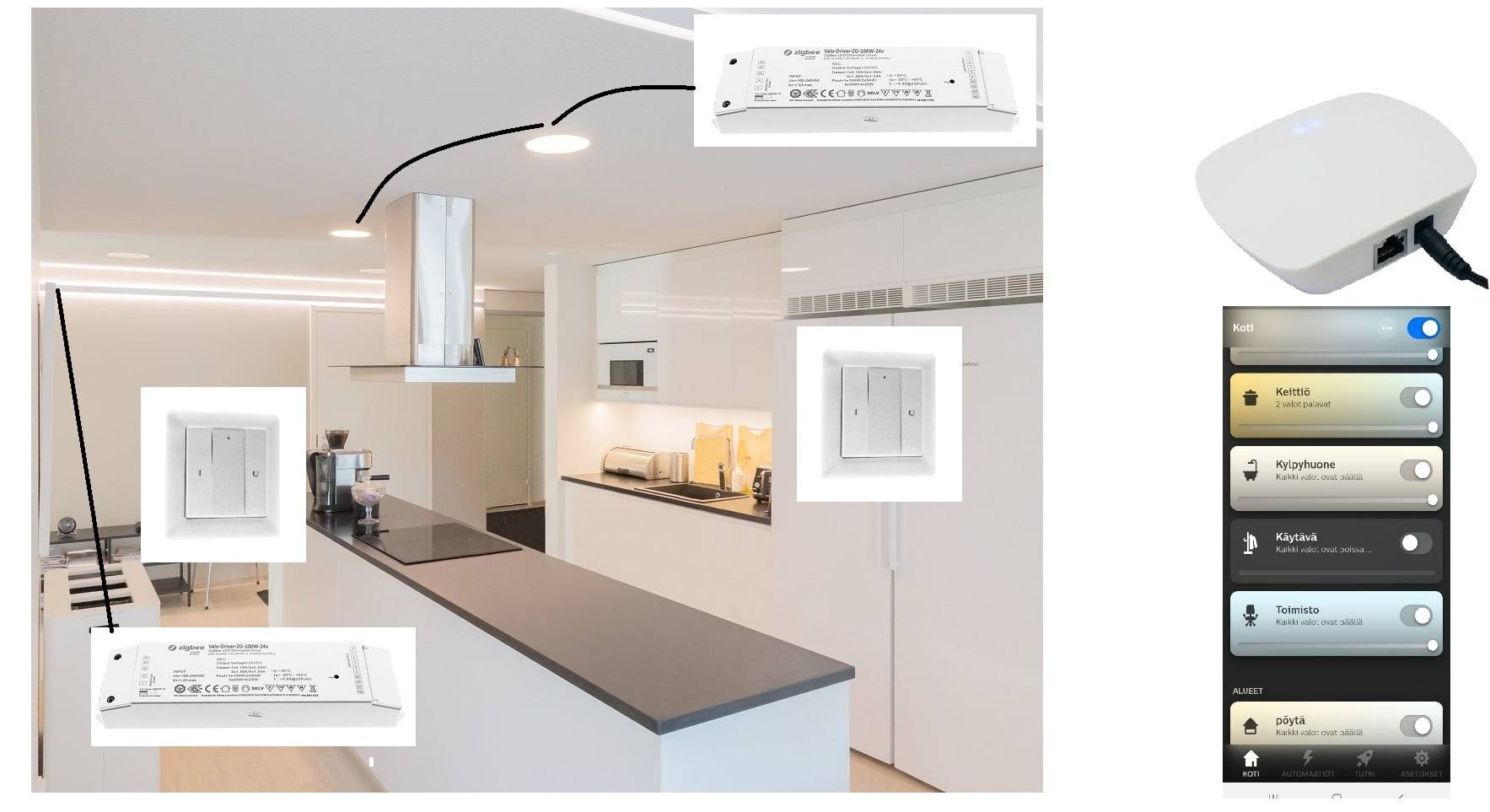
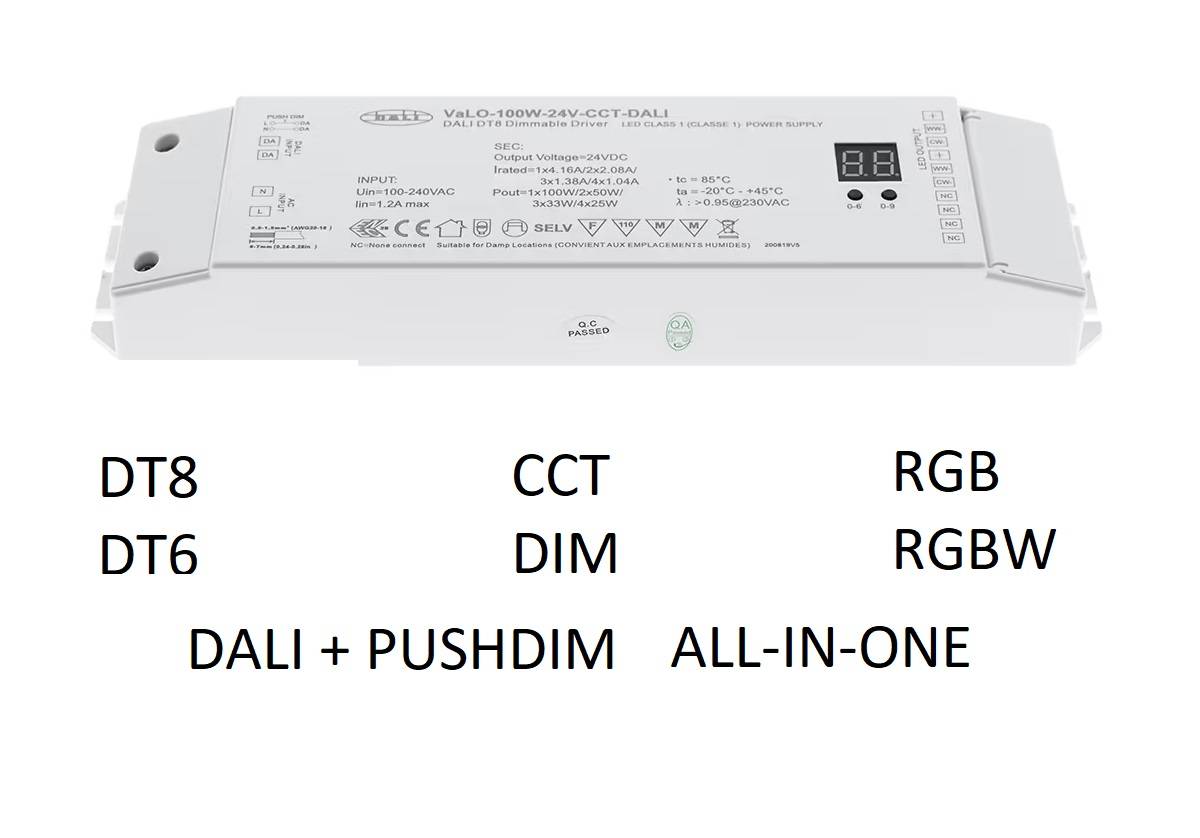
The DALI driver acts both as a power supply and as a communication unit. It converts the mains power to the LED lights and transmits DALI commands from the control system to the lights. For example, a 4-channel 200W DT8 driver allows RGBW or CCT lighting to be controlled from a single device.
DT6 and DT8: What is the difference?
DALI Device Type 6 (DT6)
DT6 controls monochrome LED lights. Each channel needs its own DALI address. Suitable for situations where each light operates independently and no colour is required.
DALI Device Type 8 (DT8)
DT8 allows you to control colours or colour temperature with a single DALI address. This makes the system simpler and more efficient, especially when controlling colour and adjustable white light.
Overview of DALI drivers for LED channels and power handling
4-channel system and power handling
The transformer has four outputs (e.g. R, G, B, W) that can be used to control multi-channel LED strips. The total power can be up to 200W (e.g. 4x50W).
Meanings of colour channels
- R - Red
- G - Green
- B - Blue
- W - White (or WW/CW)
Cabling and wiring
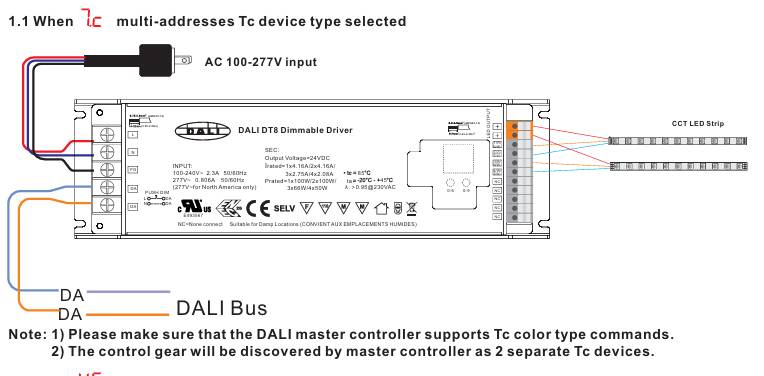
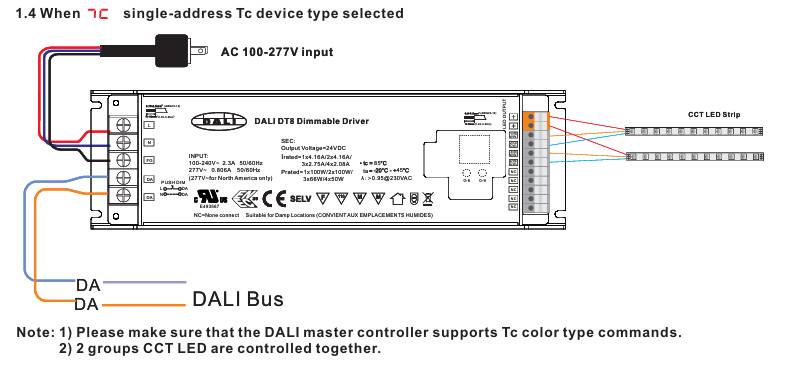
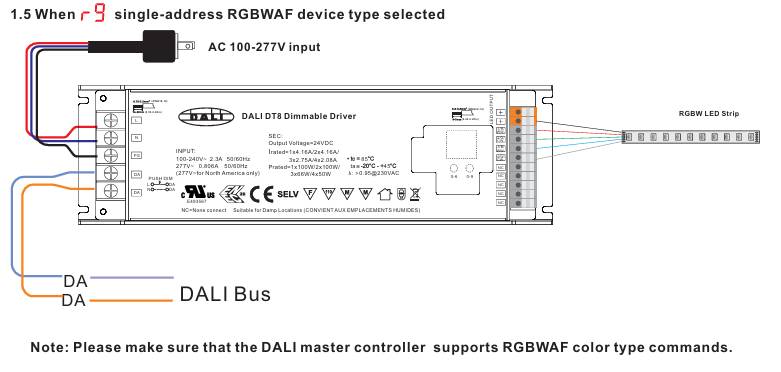
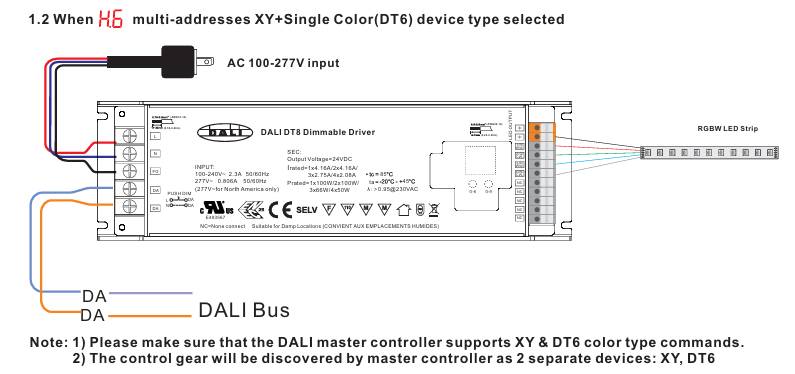
In the manual you will find the wiring diagrams: RGB, Tc, XY, R9 all have different connections. Wiring from top to bottom:
- Orange +
- Orange +
- Grey 1/R/WW
- Grey 2/G/CW
- Grey 3/B/WW
- Grey 4/W/CW
Modes of operation: 7c, Tc, R9, H5, t6, XY, explained
7c - Two CCT loads on one driver
Controls two separate Tc CCT adjustable lights with different DALI addresses. Well suited for rooms where you want to control multiple CCT light sources in different ways. Channels 1+2 and 3+4 (2 addresses)
Tc - Colour temperature control with one DALI address
Controls the warm and cold white LED with a single address. Channels 1+2 and 3+4 (1 address)
r9 - RGBWAF colour management
A six-channel mode where RGBWAF lights are managed from a single address. Suitable for precise colour management in exhibition spaces, theatres, etc. Channels 1-4 RGBW (1 address)
H6 - RGB + monochrome combined mode
Uses two indicators: one for RGB lights and one for monochrome LEDs. Combines colours and general lighting in one system. Channels 1+2+3 RGB and 4 W, (2 addresses)
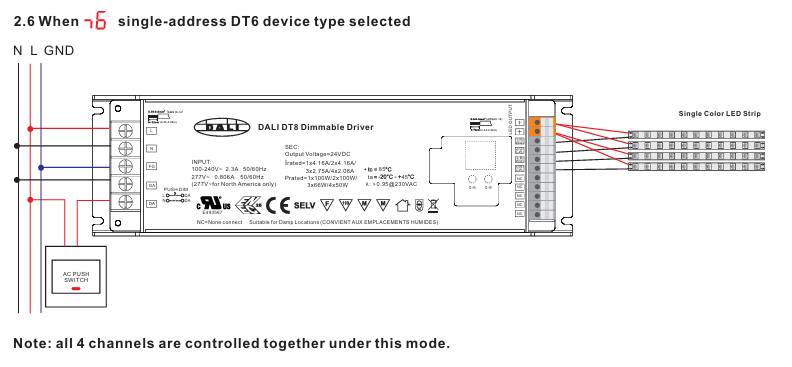
t6 - Monochrome LED control
Traditional space for monochrome LED strips. Each channel goes to the same address. Suitable for simple installations. 1-4 channels (1 address).
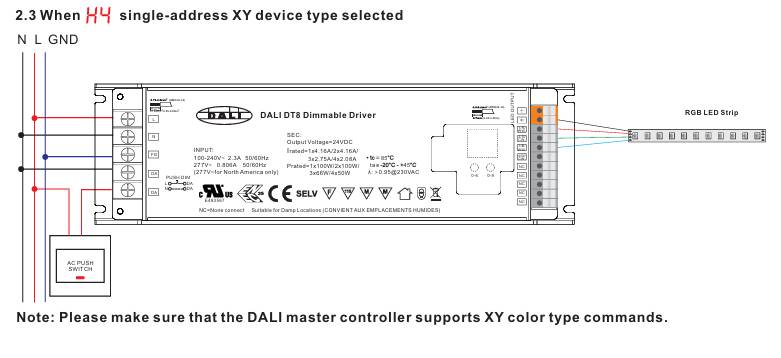
XY - RGB colour control
Uses CIE 1931 colour coordinates to control RGB colours with a single DALI address. Provides more natural colour transitions than traditional RGB. Requires Feature support from Master. Channels 1-4 (1 address)
Table
| Status | Function | DALI addresses | Best suited to |
|---|---|---|---|
| 7C | 2x CCT control | 2 | For the management of separate CCT areas |
| R9 | RGBWAF colours | 1 | Accurate colour reproduction |
| H5 | RGB + monochrome | 2 | Versatile lighting with one device |
| t6 | Monochrome LED | 1-4 | Basic installations |
| XY | RGB colour control | 1 | Most common colour control |
| Tc | CCT adjustment | 1 | Offices, homes, well-being |
Load selection and channel distribution
For example, in Tc mode 2 channels are used (WW + CW), in XY mode 3 (R+G+B), in R9 mode 4-6 channels are used.
DALI drivers can withstand 100W per channel, however, the total driver's stated total load duration.
100W = 1x100W, 2x50W or 4x25W
200W = 1x100W, 2x100Wor 4x50W
12-48V driver = 5x120W (Supports also RGB + CCT rc mode, 2 addresses)
undefined
Step-by-step programming of the DALI driver
Device profile selection for LedStore DALI drivers
- Press both buttons simultaneously until the display flashes.
- Browse modes (7C, r9, t6, XY, H5, Tc, etc.)
- Press and hold both buttons to select the mode.
- Restart the driver (usually)
Setting the DALI address
- Press and hold the left button until the numbers start flashing.
- Set the units and tens separately.
- Press and hold to save the address.
DALI address programming with DALI master
The driver can also be automatically assigned by programming the DALI master to identify 1 or 2 devices based on the set operating mode.
Use with Push dimmer
The 100W and 200W LedStore DALI driver can also be controlled with the traditional PUSHDIM button! THIS means that you can dim and adjust the light temperature with one traditional push button switch. Supports monochrome, CCT and RGB functions. NOT RGBW.
PUSHDIM functions
- Click = ON/OFF
- Long press = Brightness adjustment
- Double-click = Switch to CCT tone or colour adjustment (RGB)
Fault diagnostics and memory functions
- Overload: automatic reset
- Overheating: protection and start-up after cooling
- Memory function: remembers previous status after power off
Frequently asked questions
What space for CCT light?
Tc (one address) or 7C (2 addresses)
Can I use Push control without a DALI master?
Yes you can.
How many addresses does one transformer take?
1-4 programming depending on the mode. DIM/CCT 1 address and RGB/CCT 2-4 addresses.
Can I combine RGB and separate white light?
Yes, the H6 mode is suitable. RGB led strip and White led strip are separately at 2 addresses.
What is the best RGBW led for strip?
R9 mode is the best
Summary and recommendations
At LedStore you will find a wide range of DALI drivers and controllers. We can also help you with the design.